
Showing posts with label Linksys WRT54G upgrade. Show all posts
Showing posts with label Linksys WRT54G upgrade. Show all posts
Sunday, October 25, 2009
Tomato and Linksys WRT54G - 303 days and counting!
I've stayed with Tomato v1.19 on my older Linksys WRT54G v1.0 router, but so far, no problems. The router is on a 400VA UPS, so as long as the power doesn't drop for longer than the UPS can feed the little router, I have no doubt it can go another 300+ days or longer!


Thursday, January 01, 2009
Linksys WRT54G/WSB24 and Tomato firmware reliability update...

In a word?
Solid.
It's been a few months since I last posted about the combination of hardware and software running my home network.
Suffice it to say there's not much that can be said about a system that simply does what it's supposed to do, with a minimum of fuss.
The astute reader will notice that I do indeed have a Linksys WSB24 signal booster in the stack pictured above. Just because Linksys said it doesn't work with the WRT54G routers doesn't mean they're telling the truth. The signal booster and the Linksys HGA7T 7dbi extended antennae do a wonderful job in giving my 802.11g network plenty of range and throughput no matter where I am in the house or garage. Not bad, considering the whole rack is in the basement laundry room...
Saturday, September 27, 2008
Linksys WRT54G and Tomato Stability Update...
For all the folks who have been hitting this blog via Googling the "Linksys WRT54G" and "Tomato Firmware" search terms, thanks for the traffic. Sitemeter says you're popping in here from places far and wide, and fairly often, too. Hopefully, you're getting your questions answered - if not, just ask! Tonight's blog posting will offer another answer to a question that I'm certain is being asked.
Playing around with this remarkable little piece of hardware, I've been more than just a little intrigued with the capabilities offered by the router and the aftermarket Tomato firmware.
In fact, one of the main reasons I migrated to Tomato was that particular firmware's reputation of excellent stability. Some will recall that I had to install a timer switch in my previous Linksys WRT54G v5.0 configuration, because it routinely experienced the dreaded "5 day" lockup problem. Others more technical than I related that it was due to connections being cached, and when the buffer filled up, the router locked up. My fix was to have the router reboot by setting the digital timer to simply turn it off for one minute every morning at 5:00 AM. That worked, but seemed a Mickey Mouse type of solution at best.
The Linksys WRT54G v5.0 and later have a reduced internal memory capacity and therefore don't do well with aftermarket Linux code, save for maybe the DD-WRT Micro installation. Truthfully, I wanted more functionality and performance than that, so I kept my eyes open for versions older than v5.0, as well as the special WRT54GL and WRT54GS variants that had the larger memory and Linux compatibility.
Long story shortened, I found an early WRT54G v1.0 variant for fairly cheap (see the picture below with matching Linksys WSB-24 and Linksys 8-port switch nicely stacked on top), and proceeded to modify it with heatsinks on all the larger integrated circuits, as well as the internal Mini PCI WiFi card. I've since also added an external squirrel cage fan to the router's rack to move a steady stream of air around and through it as an added measure of protection from overheating.
Once the hardware mods were done, I upgraded the factory Linksys firmware to DD-WRT. While it was neat and provided oodles of functionality, it was slow, and made the little WRT54G struggle to run it. Maybe it was a setting or two in the menu that I didn't toggle, but the hardware and firmware combination just didn't seem too happy together.
Then I found Tomato, and immediately set about to change the DD-WRT installation to Tomato v1.11. All I can say is, "Wow!" This was exactly what I was looking for to make my WRT54G get up and go, and did it ever! It goes like a scalded cat, I kid you not. Now, since that time, Jon has released several updates to the firmware, culminating at present with v1.21. I've purposely stayed with v1.19, because I'm not too familiar with DNSmasq theory and application. I may switch to it later, but darned if what I already have isn't working just fine, so I feel no real urge to fix it or otherwise complicate a wonderful thing.
Just how fine? Put it this way - about the only time I ever reset my WRT54G v1.0 is when my ISP does something goofy with their network, and my cable modem goes wonky. Sometimes when that happens, I have to cold boot the cable modem, and I get a new IP address assigned as a result. Then I also have to reboot the D-Link DI-102 Packet Optimizer (another really neat and useful gadget) and the WRT-54G. Otherwise, like that damned Energizer Bunny, it keeps going and going and going...
For example, had it not been for a cable modem hiccup, tonight's screen capture from the Tomato status page would show something longer than 37 days of continuous operation. However, I'm not complaining very much - 37 days is much better than what I was experiencing this time last year, and I'm confident that it's by no means a record.

So, the next time I post about the hardware/firmware combination, I have considerable confidence it'll be somewhere after the 60-day mark. Jon did his part quite well, and I hope I've done mine - we'll see.

Playing around with this remarkable little piece of hardware, I've been more than just a little intrigued with the capabilities offered by the router and the aftermarket Tomato firmware.
In fact, one of the main reasons I migrated to Tomato was that particular firmware's reputation of excellent stability. Some will recall that I had to install a timer switch in my previous Linksys WRT54G v5.0 configuration, because it routinely experienced the dreaded "5 day" lockup problem. Others more technical than I related that it was due to connections being cached, and when the buffer filled up, the router locked up. My fix was to have the router reboot by setting the digital timer to simply turn it off for one minute every morning at 5:00 AM. That worked, but seemed a Mickey Mouse type of solution at best.
The Linksys WRT54G v5.0 and later have a reduced internal memory capacity and therefore don't do well with aftermarket Linux code, save for maybe the DD-WRT Micro installation. Truthfully, I wanted more functionality and performance than that, so I kept my eyes open for versions older than v5.0, as well as the special WRT54GL and WRT54GS variants that had the larger memory and Linux compatibility.
Long story shortened, I found an early WRT54G v1.0 variant for fairly cheap (see the picture below with matching Linksys WSB-24 and Linksys 8-port switch nicely stacked on top), and proceeded to modify it with heatsinks on all the larger integrated circuits, as well as the internal Mini PCI WiFi card. I've since also added an external squirrel cage fan to the router's rack to move a steady stream of air around and through it as an added measure of protection from overheating.
Once the hardware mods were done, I upgraded the factory Linksys firmware to DD-WRT. While it was neat and provided oodles of functionality, it was slow, and made the little WRT54G struggle to run it. Maybe it was a setting or two in the menu that I didn't toggle, but the hardware and firmware combination just didn't seem too happy together.
Then I found Tomato, and immediately set about to change the DD-WRT installation to Tomato v1.11. All I can say is, "Wow!" This was exactly what I was looking for to make my WRT54G get up and go, and did it ever! It goes like a scalded cat, I kid you not. Now, since that time, Jon has released several updates to the firmware, culminating at present with v1.21. I've purposely stayed with v1.19, because I'm not too familiar with DNSmasq theory and application. I may switch to it later, but darned if what I already have isn't working just fine, so I feel no real urge to fix it or otherwise complicate a wonderful thing.
Just how fine? Put it this way - about the only time I ever reset my WRT54G v1.0 is when my ISP does something goofy with their network, and my cable modem goes wonky. Sometimes when that happens, I have to cold boot the cable modem, and I get a new IP address assigned as a result. Then I also have to reboot the D-Link DI-102 Packet Optimizer (another really neat and useful gadget) and the WRT-54G. Otherwise, like that damned Energizer Bunny, it keeps going and going and going...
For example, had it not been for a cable modem hiccup, tonight's screen capture from the Tomato status page would show something longer than 37 days of continuous operation. However, I'm not complaining very much - 37 days is much better than what I was experiencing this time last year, and I'm confident that it's by no means a record.

So, the next time I post about the hardware/firmware combination, I have considerable confidence it'll be somewhere after the 60-day mark. Jon did his part quite well, and I hope I've done mine - we'll see.

Sunday, July 06, 2008
The old WRT54G on steroids, revisited...
It's been a while, several months, to be exact, since I installed the Tomato firmware in an older Linksys WRT54G wireless router and squirreled it all away in my basement laundry room with a few extra goodies. So what's happened since that January day? Well, to be frank, nothing, and that's exactly how things should be. It just plain works, and has been absolutely rock-solid, fast, and hiccup free. Truthfully, the only time I hear from it is when I go into the Tomato administration pages to see what's been going on.
I'm so enthralled with the setup that I'm thinking about buying a spare router and just sitting on it, in the event that my cooling mods only postpone the eventual demise of the juiced-up WRT54G v1.0. (Perish the thought...)
I did add another SnapServer to the mix, and positioned it squarely in the communications rack. It dishes up nearly 80Gb of media to the home users, and also plays FTP server when I'm out and about and need to retrieve a file or three. Of course, that necessitated a shuffling of components, so here's the G-98 network comm rack, looking for all the world like something out of Buckaroo Banzai:

Geeky, I know - but by Gawd, it all works, and works well!
I'm so enthralled with the setup that I'm thinking about buying a spare router and just sitting on it, in the event that my cooling mods only postpone the eventual demise of the juiced-up WRT54G v1.0. (Perish the thought...)
I did add another SnapServer to the mix, and positioned it squarely in the communications rack. It dishes up nearly 80Gb of media to the home users, and also plays FTP server when I'm out and about and need to retrieve a file or three. Of course, that necessitated a shuffling of components, so here's the G-98 network comm rack, looking for all the world like something out of Buckaroo Banzai:

Geeky, I know - but by Gawd, it all works, and works well!
Sunday, March 02, 2008
Linksys WRT54G and Tomato Firmware are your friends!
In all honesty, we hit the home network pretty hard here at Casa de' G-98. At any given time, there are 6 computers, an ethernet surveillance camera system, a couple Snap Servers, a Vonage phone modem, an MP3 media server, and so forth connected together. That whole hydra-headed mess feeds through a Linksys WRT54G router, then on to a D-Link DI-102 packet optimizer before making a left turn at the cable modem to the Intarwebz.
I could be on the workstation in the garage making a new vinyl sign for a customer, listening to MP3s stored on the Snap Servers, while Mrs. G-98 is browsing the Web and on the phone with her mom, and the two WarCrack addicts are hot and heavy in another quest for Gawd knows what.
I used to experience lock-ups of the network after about 5 days of "average" use in my house. This stemmed back to a glitch in the factory Linksys WRT-54G v5.0 firmware - it tracks connections for 5 days, but doesn't flush them when the cache fills up. Once that cache fills, it locks up, and you need to reboot the thing. An earlier fix required me to add a digital audio timer to the power side of the router, forcing a reboot at 5:00 AM every morning. That worked fine, but really didn't address the problem, although it somewhat tidied up my basement communications rack system:

Doing some homework, I learned about the big aftermarket for earlier versions of the Linksys WRT54G made prior to v5.0. It appears they had more internal memory, and ran a version of Linux as their firmware of choice. Being a dabbler in all things Linux, this got my attention! The two top contenders in the line-up were DD-WRT and Tomato, neither of which would work on my original WRT54G v5.0 router - so I had to find either one of the older, large-memory versions, or one of the WRT54GS versions Linksys marketed for aftermarket firmware.
Fast-forward a few weeks, and I'm the proud owner of a very early model WRT54G v1.0, distinguishable by the lack of Cisco labeling, as well as the 20 or so diagnostic LEDs on the front panel not found on later versions. I immediately set about to modify the thing, because I wanted it to last for a very long time in its new role. Hey, it's not like the warranty would be voided, so off came the external cover. A tiny 5-volt fan went inside the case, as did about a half-dozen finned heat sinks on the bigger chips, all to cool the little router and increase longevity for the long term.
Installing DD-WRT was quite straightforward, but you could tell that the feature-rich firmware really bogged down the WRT54G v1.0, it just plain crawled. I'd been warned that the WRT54G v1.0 had a slower Broadcom CPU, 125Mhz vs. the later 200Mhz processors, but that 75Mhz difference really didn't explain the slowdown I was experiencing. I debated tweaking the myriad user-configurable options, or installing either the Mini or Micro variety of DD-WRT, but had also been wanting to try Tomato, so I moved on to the latter.
Wow! Tomato's installation was downright easy, and once the router rebooted itself, things fell into place nicely. As a matter of fact, the router has been running Tomato ever since, with nary a hiccup. That 75Mhz drop in CPU speed? You'll never know it's there, the router's throughput and efficiency with the lean Tomato code is just that quick. I let it run without any adjustments whatsoever for a week, just to see if I could get by the dreaded 5-day hurdle. No problems, so I started entering port forwarding addresses for Vonage, WarCrack, Ventrilo, you name it, all by the IP addresses of those machines needing the port adjustments. Then I prioritized traffic based on those ports, such that our phone calls would take the top of the bandwidth heap, then down from there. The results were impressive, and with the packet streamlining of the D-Link DI-102 in conjunction with the Tomato QOS functions, my Vonage voice conversations have been crystal-clear.
There's also a full Wireless-G suite, with a particularly neat feature - you can adjust the transmitter's output wattage to boost your signal strength over distance. Bear in mind, you don't get something for nothing, and I purposely put additional cooling measures inside my WRT54G's chassis to dissipate the heat generated by the increased transmitter output. I had to look pretty silly walking through the snow in my backyard with laptop turned on, checking out the range of my Wireless-G signal, but darned if it doesn't work as advertised! I had considered getting an older WSB24 outboard signal booster to better feed my Dell Inspiron notebook while on the back deck, but the power adjustment in Tomato quite honestly matches the gain offered by the former device without need to further complicate things.
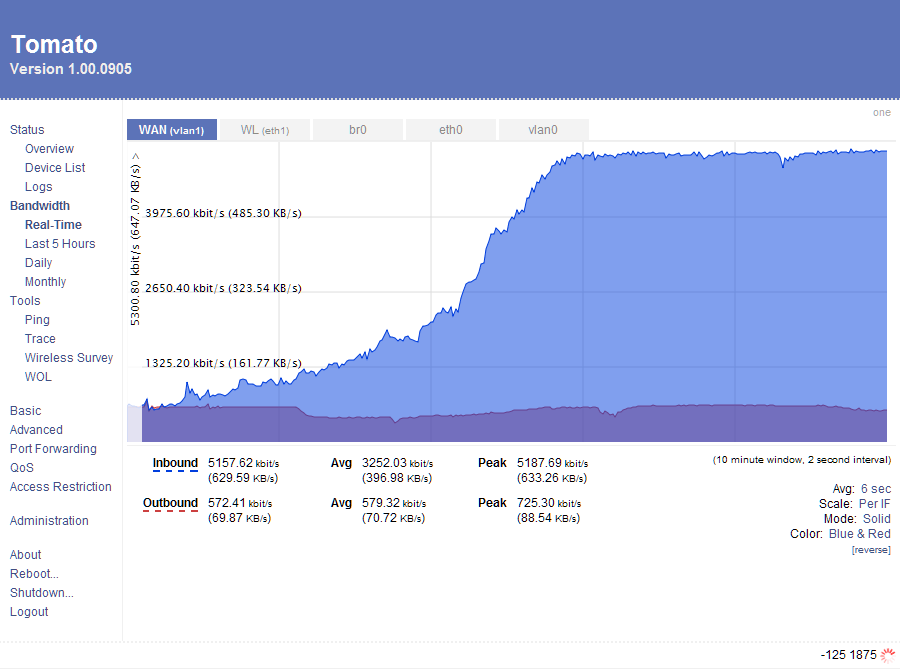
That just scratches the surface, and the firmware includes some very comprehensive logging abilities, complete with a real-time scrolling bandwidth meter, a 24-hour chart, and logs that go from daily, to weekly, to monthly (Image courtesy of the author's website):

That's pretty doggone nice, and Jon (the author) has been very busy with improvements and upgrades, several having been released since January of this year alone! What I had considered a cheap and perhaps disposable piece of networking gear is now nearly indispensable, performing functions well outside the $35.00 I paid for it. I upgraded the communications rack to better support the upgraded router, as well as adding another 5-port switch for later expansion of the network.

Yeah, I know it ain't terribly professional, but it does what my MCSE-addled brain set it up to do, and the time-switched outlet of the clock has been set to "always on" with no need to reboot the router so far, having gone just over 30 days of glitch-free operation. Jon, I doubt you need more endorsements, but you're getting one from me, and I heartily recommend that owners of these little blue Linksys boxes head to your website to get their own version of your Tomato firmware:
http://www.polarcloud.com/tomato
I could be on the workstation in the garage making a new vinyl sign for a customer, listening to MP3s stored on the Snap Servers, while Mrs. G-98 is browsing the Web and on the phone with her mom, and the two WarCrack addicts are hot and heavy in another quest for Gawd knows what.
I used to experience lock-ups of the network after about 5 days of "average" use in my house. This stemmed back to a glitch in the factory Linksys WRT-54G v5.0 firmware - it tracks connections for 5 days, but doesn't flush them when the cache fills up. Once that cache fills, it locks up, and you need to reboot the thing. An earlier fix required me to add a digital audio timer to the power side of the router, forcing a reboot at 5:00 AM every morning. That worked fine, but really didn't address the problem, although it somewhat tidied up my basement communications rack system:

Doing some homework, I learned about the big aftermarket for earlier versions of the Linksys WRT54G made prior to v5.0. It appears they had more internal memory, and ran a version of Linux as their firmware of choice. Being a dabbler in all things Linux, this got my attention! The two top contenders in the line-up were DD-WRT and Tomato, neither of which would work on my original WRT54G v5.0 router - so I had to find either one of the older, large-memory versions, or one of the WRT54GS versions Linksys marketed for aftermarket firmware.
Fast-forward a few weeks, and I'm the proud owner of a very early model WRT54G v1.0, distinguishable by the lack of Cisco labeling, as well as the 20 or so diagnostic LEDs on the front panel not found on later versions. I immediately set about to modify the thing, because I wanted it to last for a very long time in its new role. Hey, it's not like the warranty would be voided, so off came the external cover. A tiny 5-volt fan went inside the case, as did about a half-dozen finned heat sinks on the bigger chips, all to cool the little router and increase longevity for the long term.
Installing DD-WRT was quite straightforward, but you could tell that the feature-rich firmware really bogged down the WRT54G v1.0, it just plain crawled. I'd been warned that the WRT54G v1.0 had a slower Broadcom CPU, 125Mhz vs. the later 200Mhz processors, but that 75Mhz difference really didn't explain the slowdown I was experiencing. I debated tweaking the myriad user-configurable options, or installing either the Mini or Micro variety of DD-WRT, but had also been wanting to try Tomato, so I moved on to the latter.
Wow! Tomato's installation was downright easy, and once the router rebooted itself, things fell into place nicely. As a matter of fact, the router has been running Tomato ever since, with nary a hiccup. That 75Mhz drop in CPU speed? You'll never know it's there, the router's throughput and efficiency with the lean Tomato code is just that quick. I let it run without any adjustments whatsoever for a week, just to see if I could get by the dreaded 5-day hurdle. No problems, so I started entering port forwarding addresses for Vonage, WarCrack, Ventrilo, you name it, all by the IP addresses of those machines needing the port adjustments. Then I prioritized traffic based on those ports, such that our phone calls would take the top of the bandwidth heap, then down from there. The results were impressive, and with the packet streamlining of the D-Link DI-102 in conjunction with the Tomato QOS functions, my Vonage voice conversations have been crystal-clear.
There's also a full Wireless-G suite, with a particularly neat feature - you can adjust the transmitter's output wattage to boost your signal strength over distance. Bear in mind, you don't get something for nothing, and I purposely put additional cooling measures inside my WRT54G's chassis to dissipate the heat generated by the increased transmitter output. I had to look pretty silly walking through the snow in my backyard with laptop turned on, checking out the range of my Wireless-G signal, but darned if it doesn't work as advertised! I had considered getting an older WSB24 outboard signal booster to better feed my Dell Inspiron notebook while on the back deck, but the power adjustment in Tomato quite honestly matches the gain offered by the former device without need to further complicate things.
That just scratches the surface, and the firmware includes some very comprehensive logging abilities, complete with a real-time scrolling bandwidth meter, a 24-hour chart, and logs that go from daily, to weekly, to monthly (Image courtesy of the author's website):
That's pretty doggone nice, and Jon (the author) has been very busy with improvements and upgrades, several having been released since January of this year alone! What I had considered a cheap and perhaps disposable piece of networking gear is now nearly indispensable, performing functions well outside the $35.00 I paid for it. I upgraded the communications rack to better support the upgraded router, as well as adding another 5-port switch for later expansion of the network.

Yeah, I know it ain't terribly professional, but it does what my MCSE-addled brain set it up to do, and the time-switched outlet of the clock has been set to "always on" with no need to reboot the router so far, having gone just over 30 days of glitch-free operation. Jon, I doubt you need more endorsements, but you're getting one from me, and I heartily recommend that owners of these little blue Linksys boxes head to your website to get their own version of your Tomato firmware:
http://www.polarcloud.com/tomato
Subscribe to:
Posts (Atom)